The half-size photo is 3 × 4 cm
The half-size photo (banmyeonghampan) is 3 cm wide and 4 cm tall and is common on forms that each organization sets for itself, such as résumés, job applications and exam applications. It is not a size set by law like the passport or resident card photo, so follow the destination’s instructions if they name a different size.
At 300 dpi, 3 cm is 354 pixels and 4 cm is 472 pixels. The half-size option in FileFit’s ID photo tool produces 354 × 472 pixels. There is no official head-size rule for this photo, so the tool shows no face guide lines for it.
Passport, resident card and driver’s license are all 3.5 × 4.5 cm
The Korean Ministry of Foreign Affairs passport guide sets the passport photo at 3.5 cm by 4.5 cm with a head length, from the crown to the chin, of 3.2 to 3.6 cm. It recommends 413 × 531 pixels for online applications.
The Ministry of the Interior and Safety’s resident registration card guide asks for a 3.5 × 4.5 cm upper-body photo without a hat, taken within the last six months, and says a photo taken to passport standards works for both the resident card and the passport. A plain or white background is recommended and a light single color is also allowed. Retouched or copied photos that make identification difficult can’t be used.
The Korea Road Traffic Authority announced that from 1 March 2026 it strictly applies the passport photo standard to driver’s licenses. The photo must be 3.5 × 4.5 cm with a head length of 3.2 to 3.6 cm, a white or near-white background, in color and taken within six months, and at least 70% of each eyebrow must be visible. It says photos that don’t meet the standard are turned away at the counter.
What happened in a test run
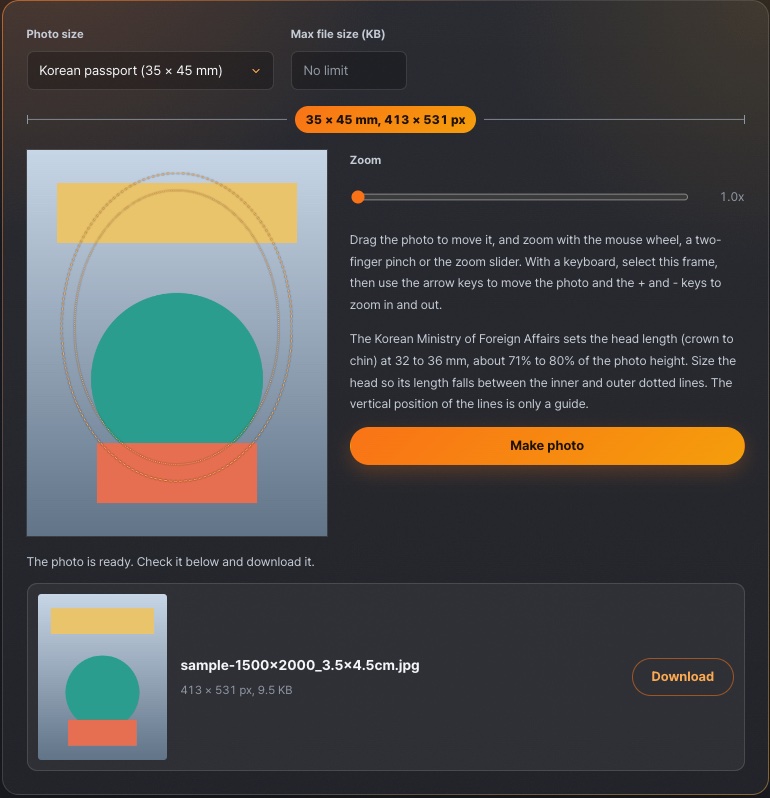
We loaded a 1500 × 2000 pixel sample image into the passport and ID photo tool and chose the Korean passport preset (35 × 45 mm). The frame label showed 413 × 531 px, and the finished file was 413 × 531 pixels and 9.5 KB. The sample has no face, so we did not check how a face fits the guide lines, only the pixel size and file size.
Pixel sizes for each standard
When you upload a photo file online, what matters is the pixel width and height rather than centimeters. One inch is 2.54 cm, so divide the centimeter value by 2.54 and multiply by 300 dpi to get the pixel count.
If the upload page lists its own pixel size, that value takes priority over this calculation. If there is a file size limit, enter it in the ID photo tool’s max file size (KB) box as well.
- Half-size 3 × 4 cm: 354 × 472 pixels
- Passport, resident card and driver’s license 3.5 × 4.5 cm: 413 × 531 pixels
- US visa and passport 2 × 2 inches (5.08 × 5.08 cm): 600 × 600 pixels
Checking a photo’s size in centimeters
A photo file has no physical length, only a pixel width and height. Its size in centimeters depends on the dpi it is printed at, so divide the pixel count by the dpi and multiply by 2.54. For example, 413 pixels printed at 300 dpi is 413 ÷ 300 × 2.54, or about 3.5 cm.
The same photo prints larger at a lower dpi and smaller at a higher dpi. When you order prints, it is more reliable to set the print size to the standard, such as 3.5 × 4.5 cm, than to change the dpi.
- On a computer, check the pixel width and height in the file’s properties or info window.
- Calculate width in pixels ÷ 300 × 2.54 to get the width in centimeters at 300 dpi, and do the same for the height.
- If the width-to-height ratio differs from the standard, don’t stretch the photo. Crop it to the standard frame in the ID photo tool instead.
What to check besides size
Even at the right size, a photo can be rejected if the date taken, background, expression or retouching doesn’t meet the rules. The passport, resident card and driver’s license all require a front-facing photo taken within six months and don’t allow anything that covers the face, such as hats or tinted glasses.
FileFit crops the photo to the standard ratio and sets the pixel size and file size only. It doesn’t change the background or retouch the face. Requirements can change, so check the organization’s latest instructions right before you submit.